//At a glance

What each tool answers, and where the data comes from

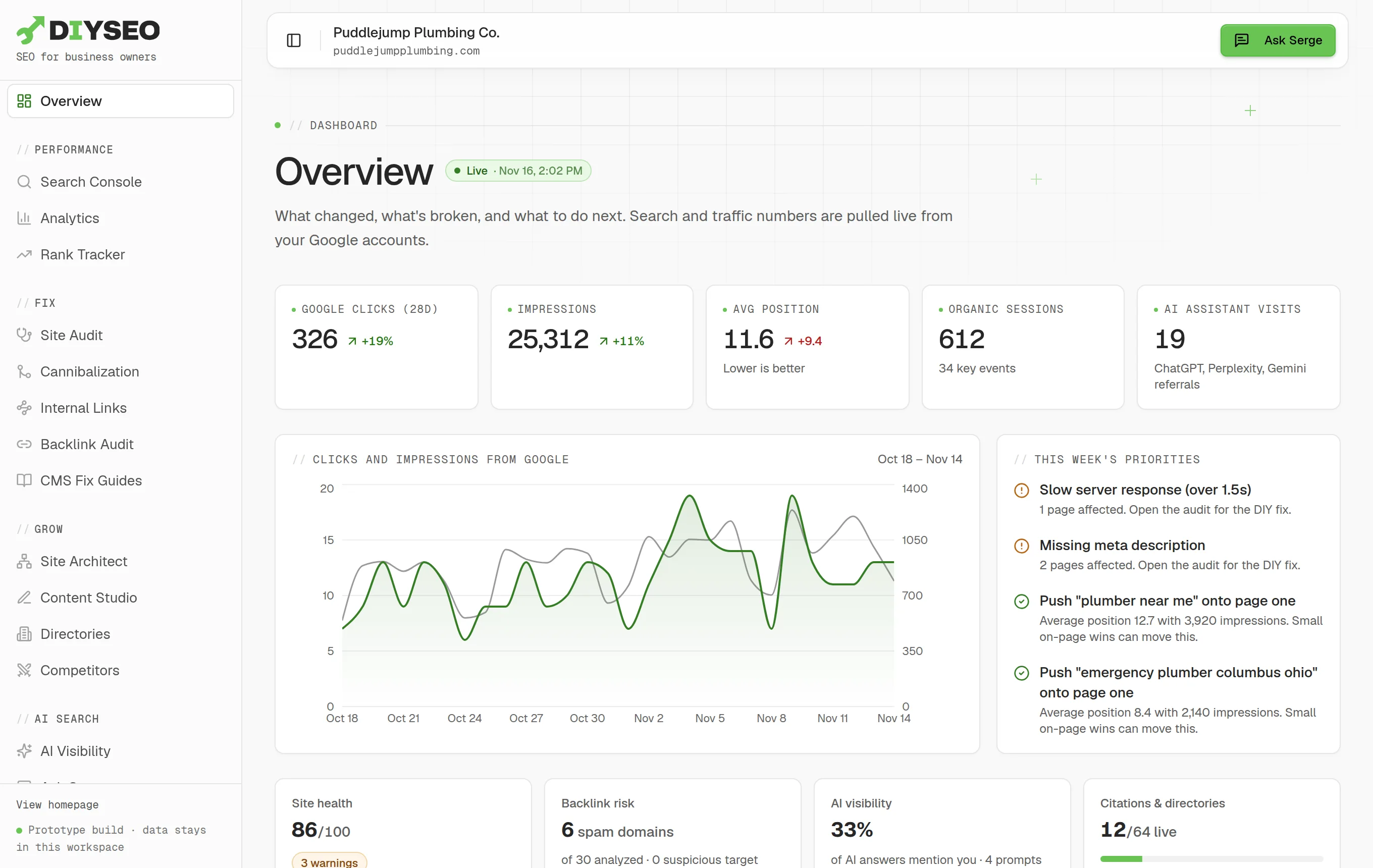
Overview and weekly prioritiesA weekly snapshot of how your site is doing, with a short list of what to do next.Data: Search Console, Analytics, your site audit and backlinks
Action Plan and publishing calendarOne ranked list of what to do first, and a calendar that shows when each piece of content should go live.Data: Your site audit, Search Console, cannibalization, internal link and backlink reports, Site Architect, Information Gain and Content Studio
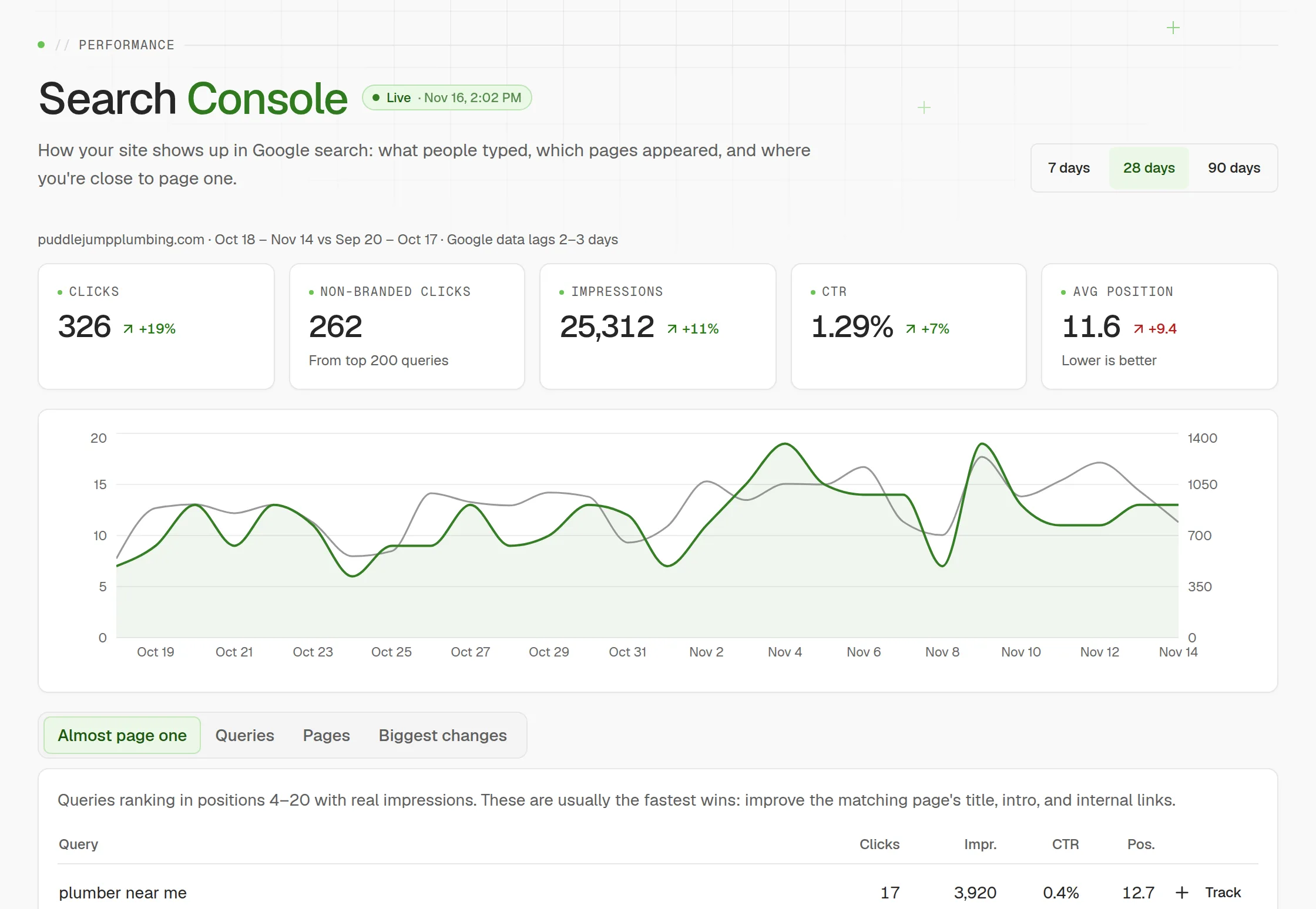
Live Search Console dashboardHow your site shows up in Google: what people searched, which pages appeared, and where you're close to page one.Data: Google Search Console (read-only)
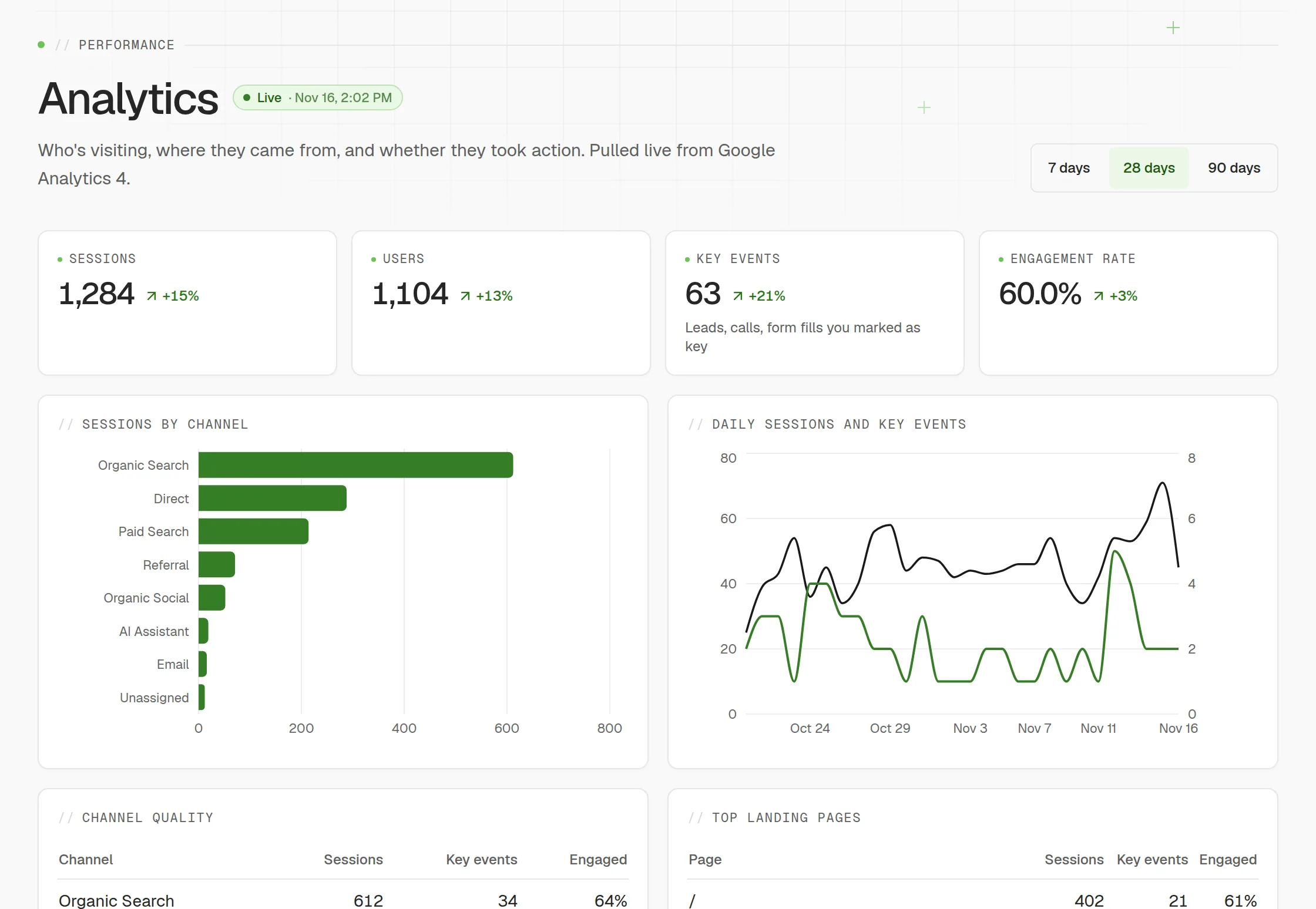
Google Analytics 4 dashboardWho's visiting, where they came from, and whether they took action.Data: Google Analytics 4 (read-only)
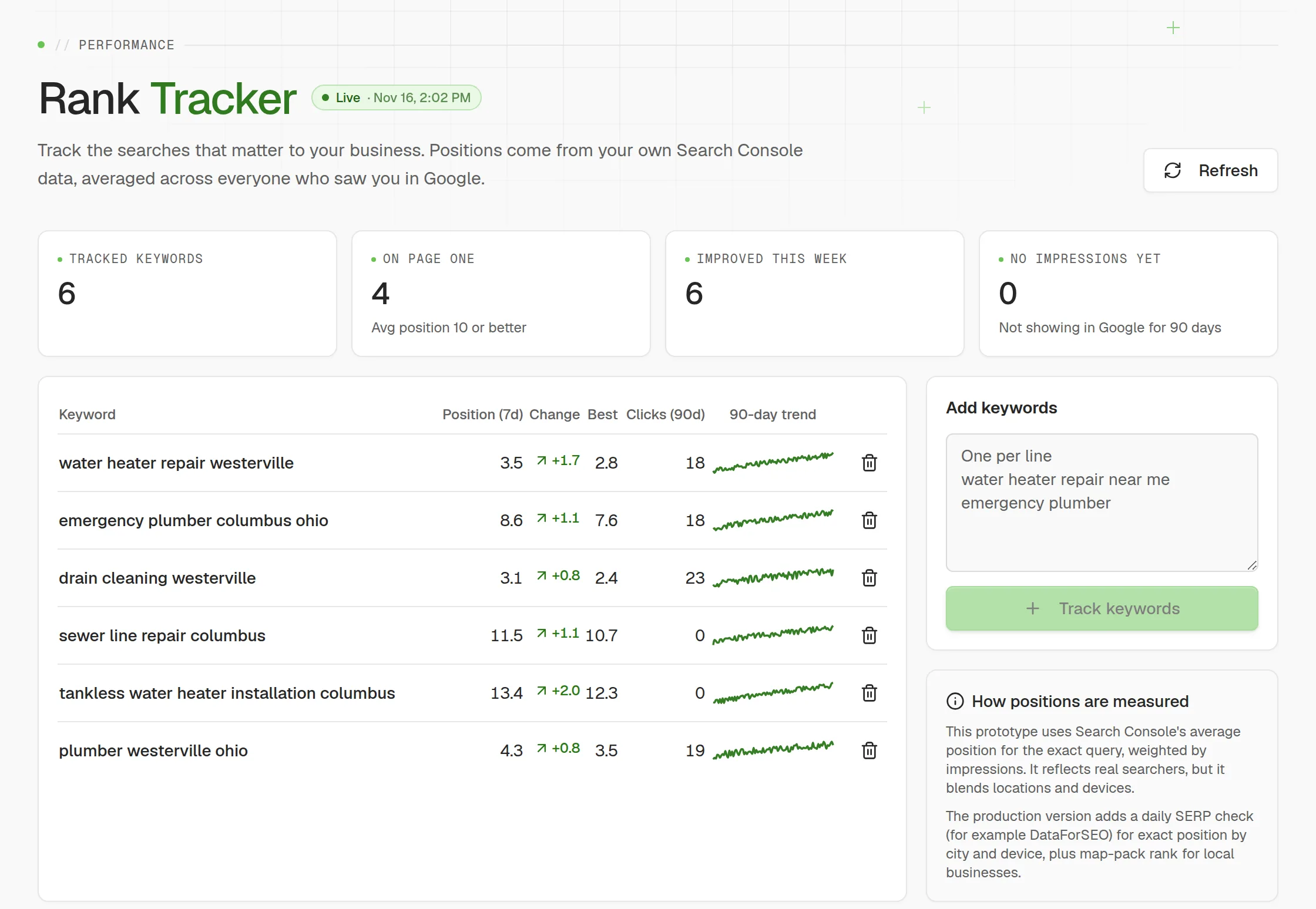
Keyword position trackingTrack the searches that matter to your business and watch your position over time.Data: Search Console history plus live Google checks
Map Rank TrackingAdd-onWhere your Google Business Profile shows up on Google Maps across a grid of points around your business.Data: Live Google Maps searches from each grid point
Performance alert emailsAn email when your Google numbers move, so you don't have to check every day.Data: Google Search Console
Site audit with DIY fixesCrawls your site the way Google does, scores what it finds, and explains each fix in plain English.Data: DIY SEO's own crawl of your website
Fix guides for your website platformStep-by-step instructions for applying each recommendation on the platform your site runs on.Data: DIY SEO's guide library
Keyword cannibalization checkFinds searches where two or more of your own pages compete, and tells you which page to keep.Data: Google Search Console
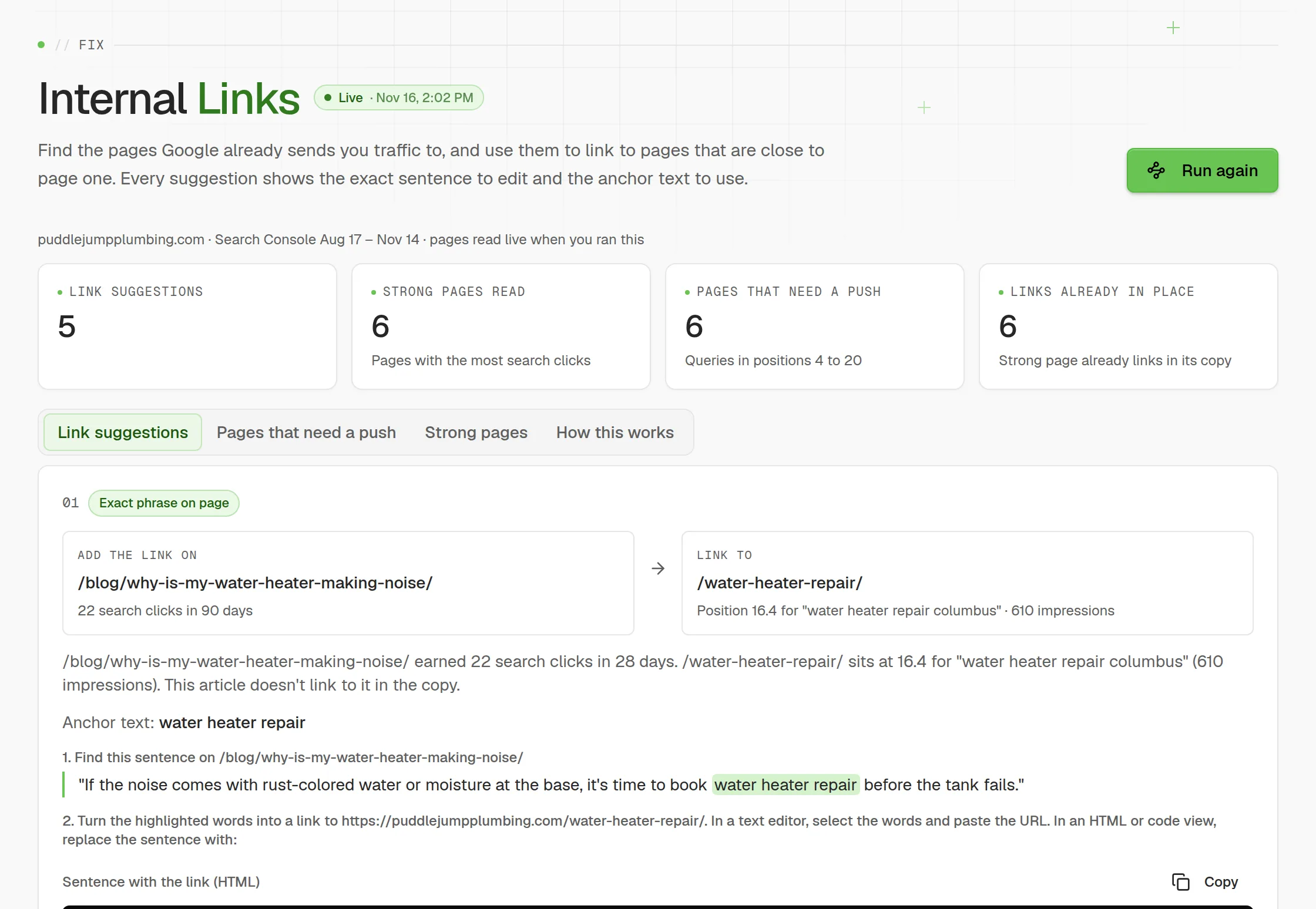
Internal link suggestionsUses pages Google already sends you traffic to, to give a push to pages that are close to page one.Data: Search Console plus your live pages
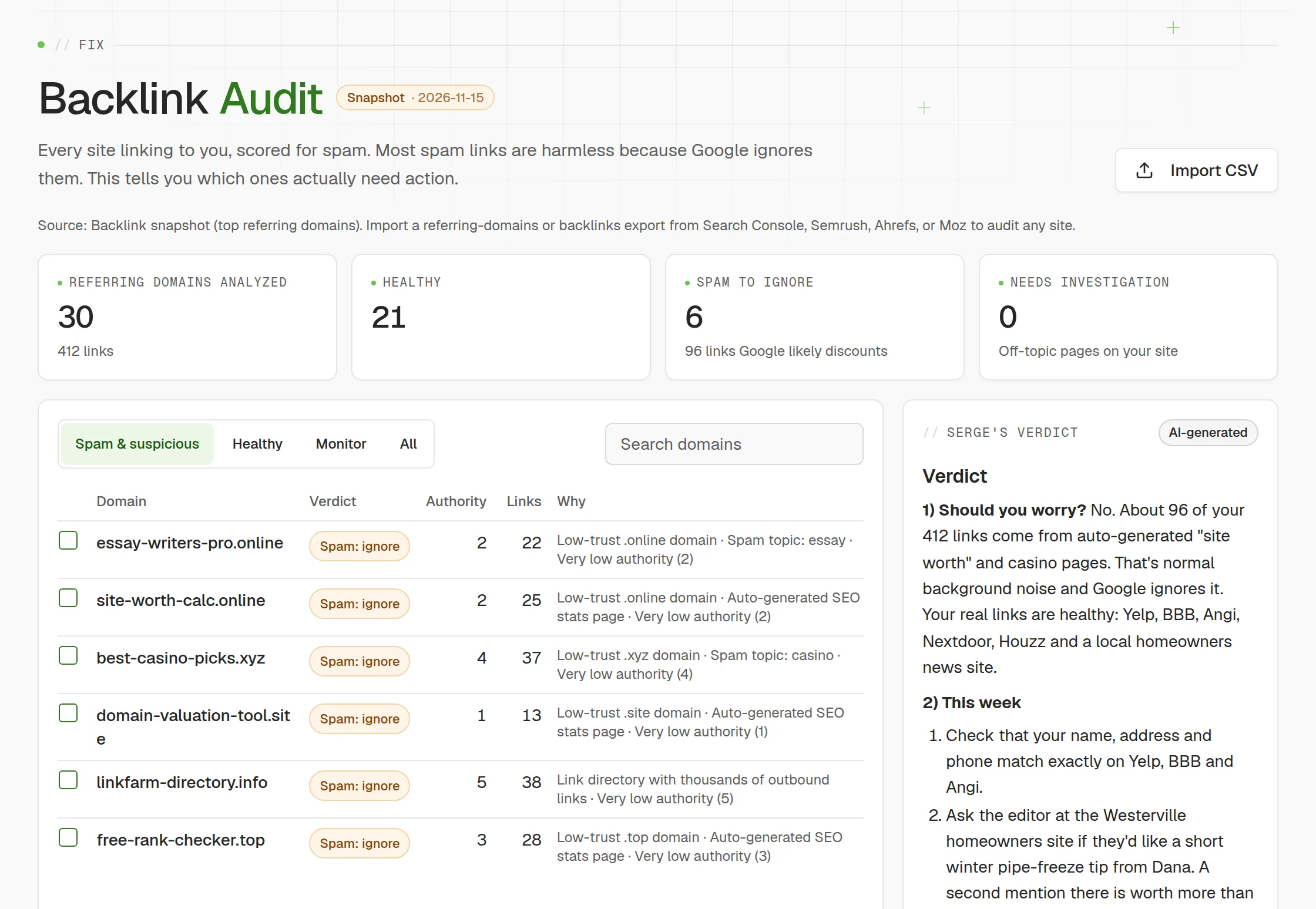
Backlink auditEvery site linking to you, scored for spam, with a clear answer on which links actually need action.Data: Live backlink data from DataForSEO, or an export you upload
Keyword research and topic ideasFind what customers search, how many search each month, and how hard each search is to rank for.Data: DataForSEO (Google, United States) joined with your Search Console
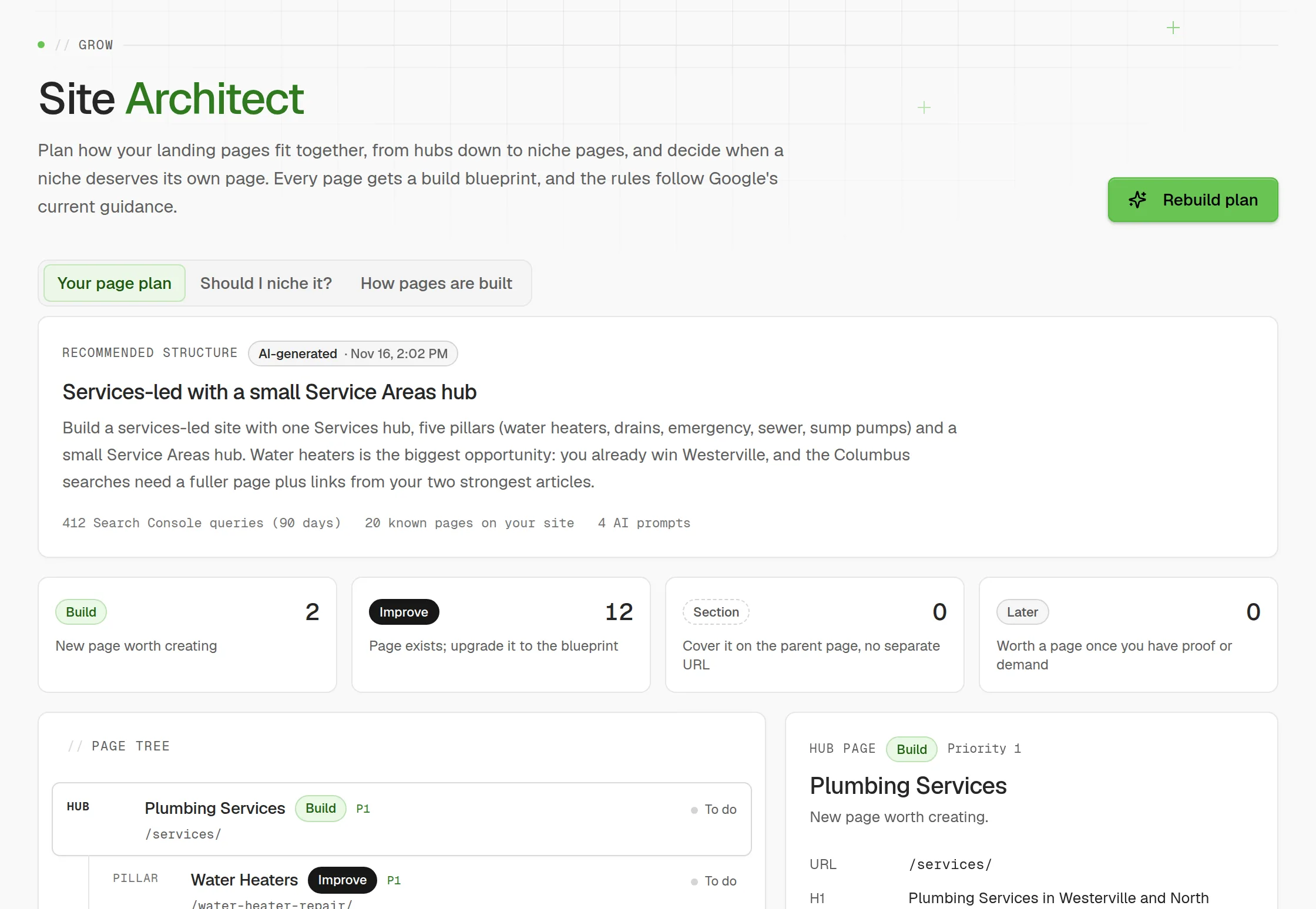
Site ArchitectPlan how your landing pages fit together, from hub pages down to niche pages, with a build blueprint for each.Data: Your business profile, 90 days of Search Console searches, your site's pages and tracked AI prompts
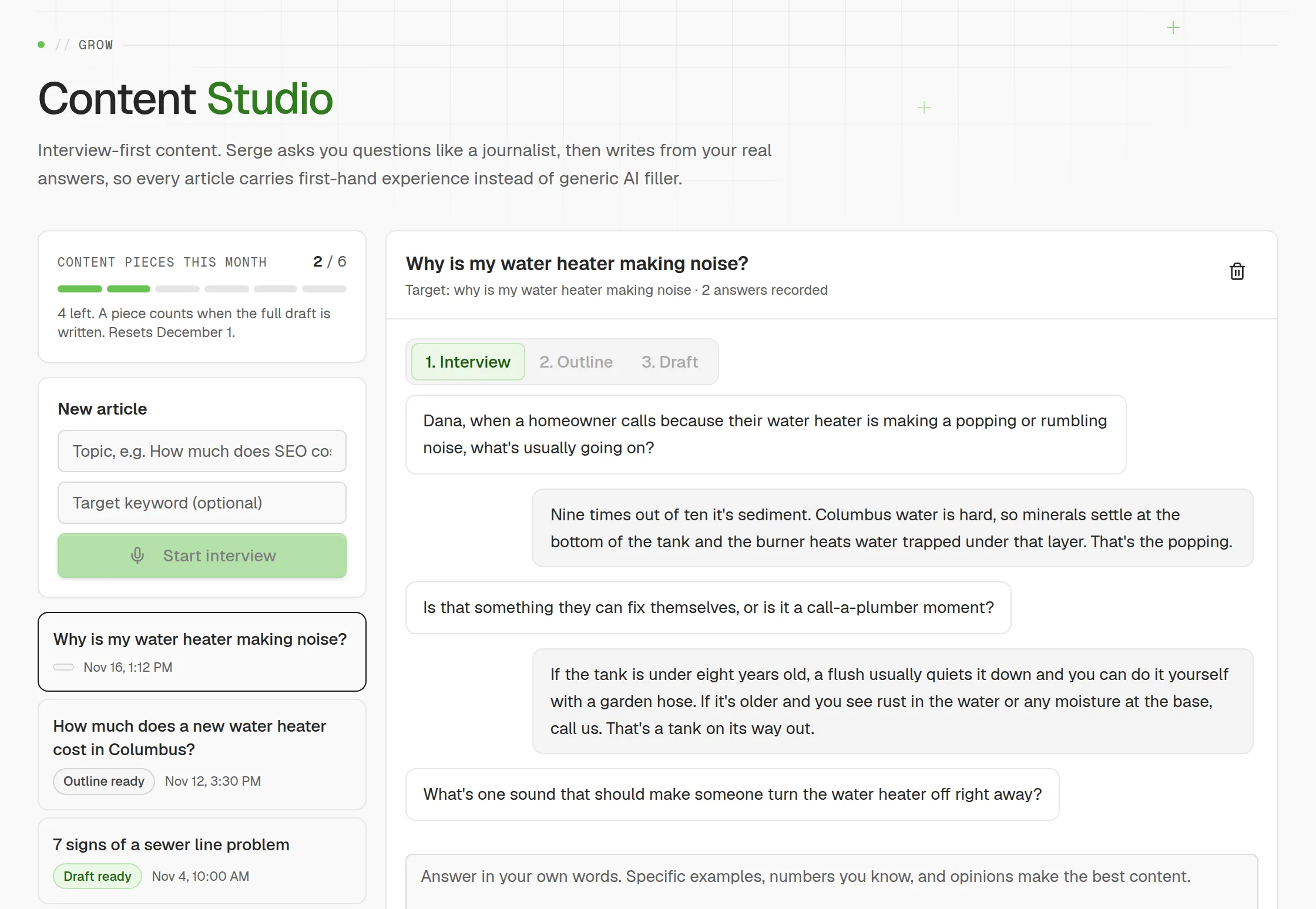
Interview-based contentSerge interviews you like a journalist, then writes from your real answers, so every article carries first-hand experience.Data: Your interview answers, with a length benchmark from the top 5 Google results
Information Gain for existing postsFinds the posts in your sitemap that are close to ranking but not winning, then shows what the top results all cover and what none of them say that you can add.Data: Your XML sitemap, 90 days of Search Console data and the live top Google results for each post's search
Directory recommendationsWhere your business should be listed, matched to your industry, business model and platforms.Data: DIY SEO's library of 387 directories, checked in November 2026
Competitor researchSee why a competitor outranks you, and what their page has that yours doesn't.Data: DIY SEO's crawl of both pages plus DataForSEO link and ranking data
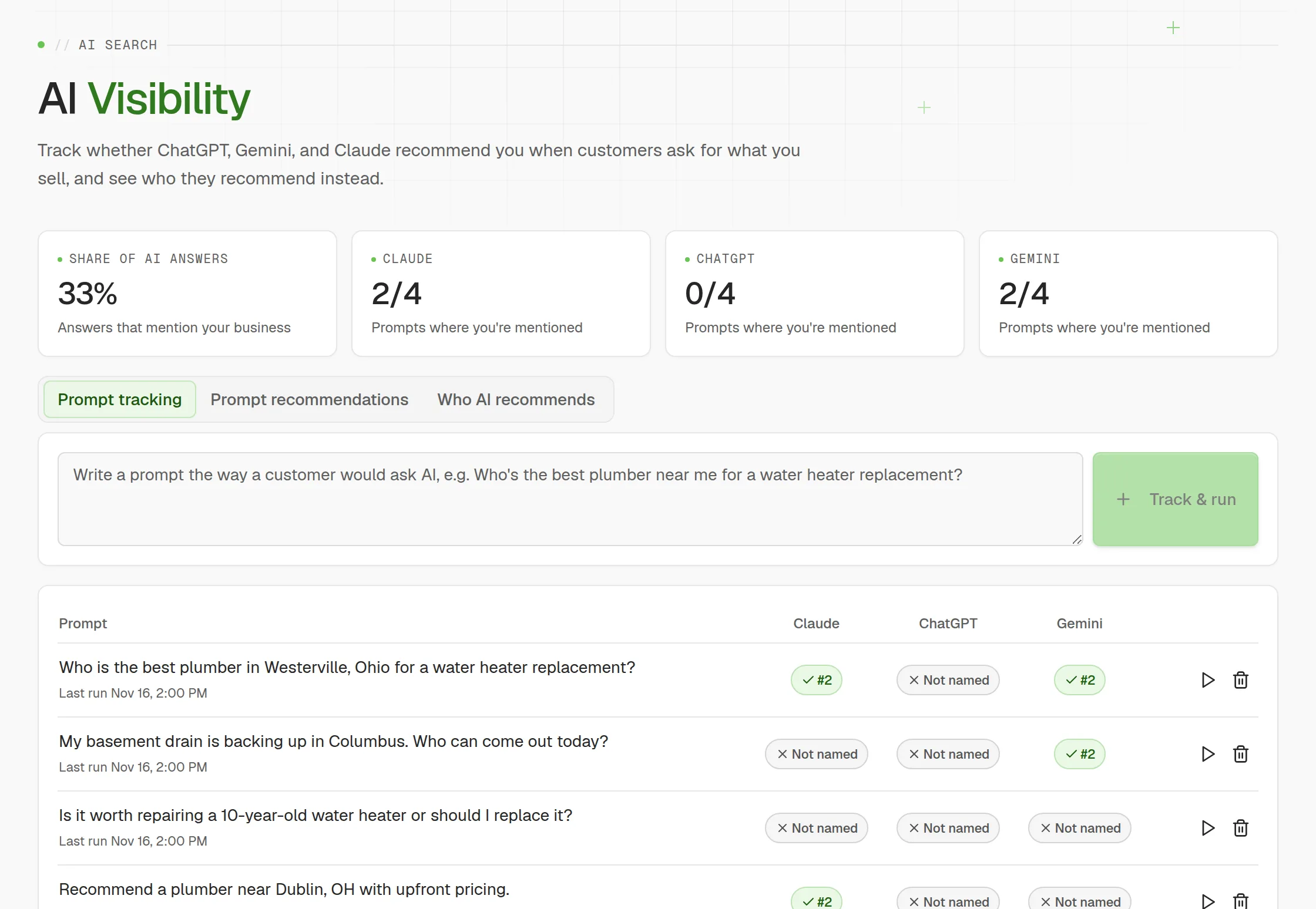
AI prompt tracking and recommendationsTrack whether ChatGPT, Gemini and Claude mention your business when customers ask for what you sell.Data: Answers from ChatGPT, Gemini and Claude
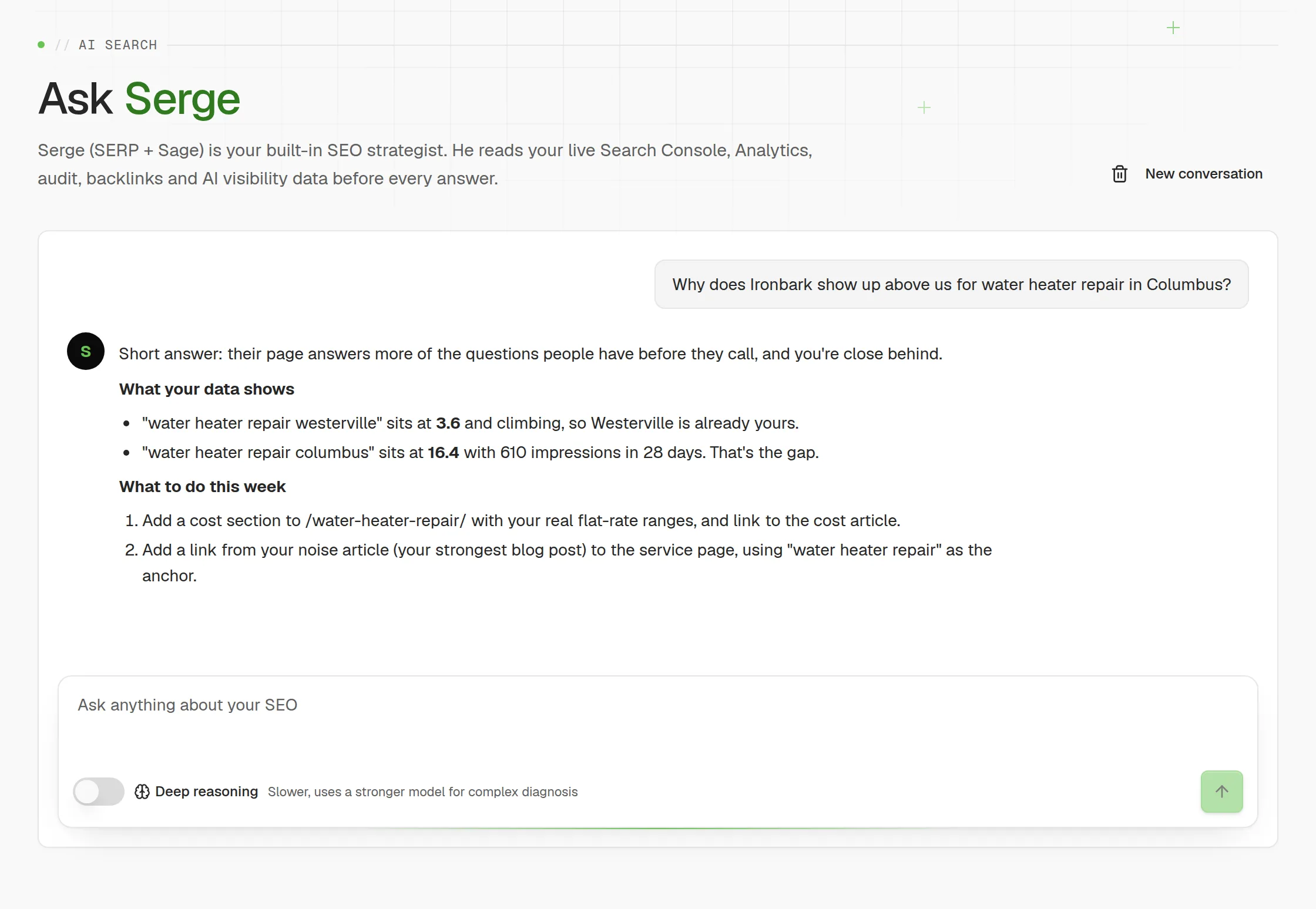
Serge, the SEO assistantAsk questions in plain words. Serge (SERP + Sage) reads your connected data before answering.Data: Your Search Console, Analytics, audit, backlinks and AI visibility
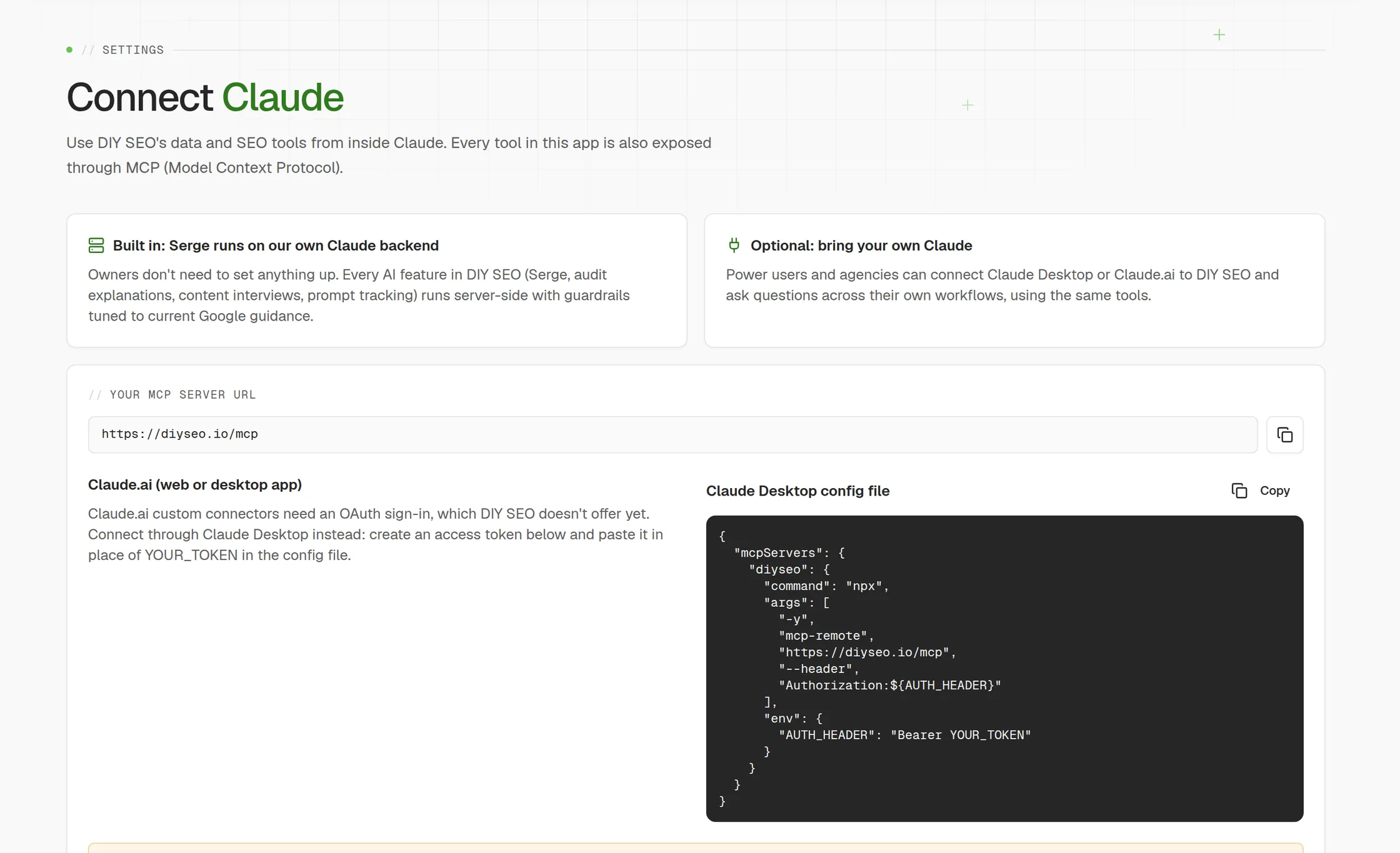
Connect Claude through MCPOptional: use DIY SEO's data and tools from inside your own Claude Desktop.Data: The same DIY SEO tools, over MCP (Model Context Protocol)
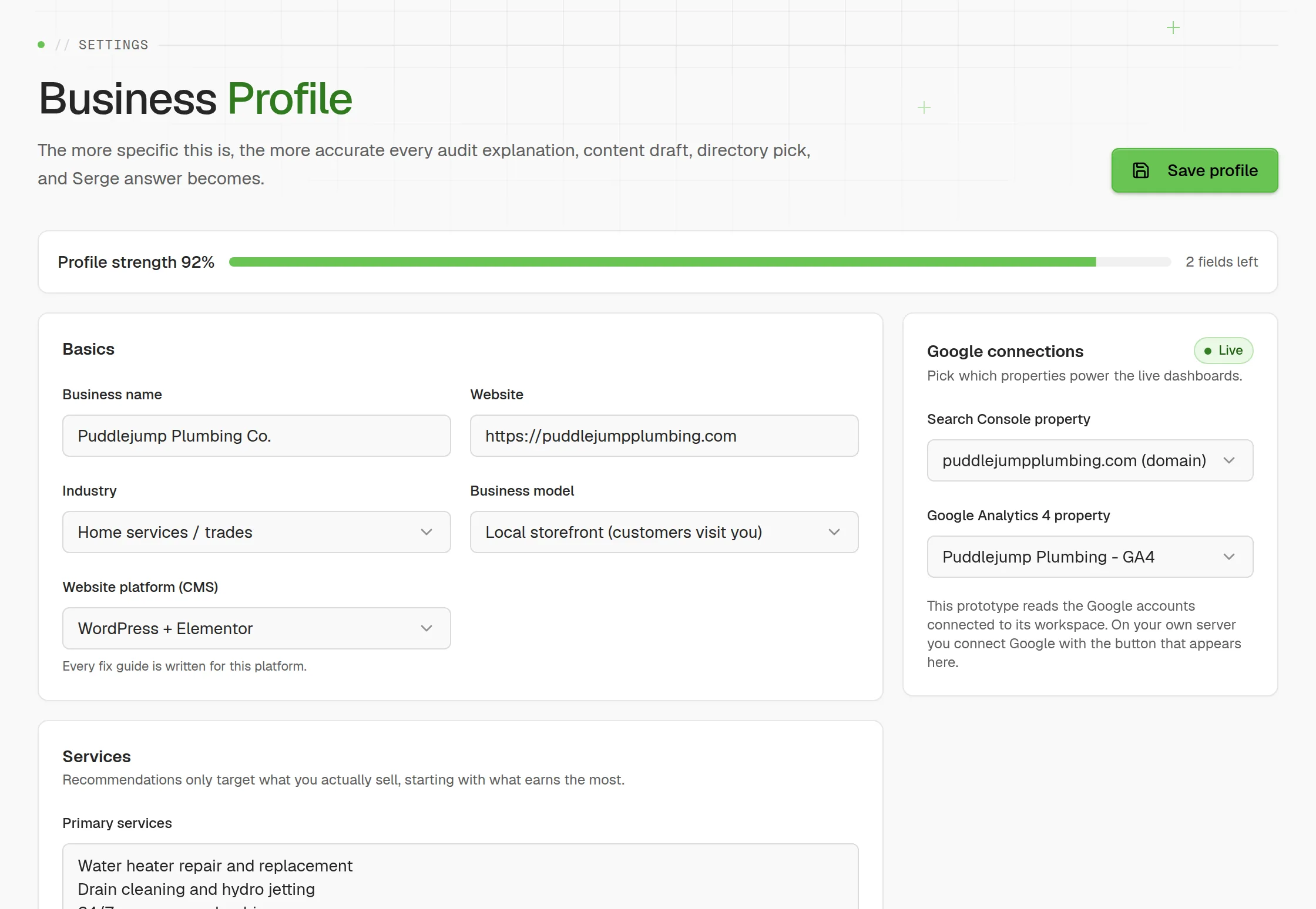
Business profile and locationsGoes deeper than a name and address. The more you add, the more accurate every recommendation becomes.Data: You
//Performance

Performance

Your real Google numbers, read-only, in plain terms.

Overview and weekly priorities

A weekly snapshot of how your site is doing, with a short list of what to do next.

How it works
  • Clicks, impressions, average position and organic visits come straight from your Google accounts, not estimates.
  • Site health, backlink risk, AI visibility and directory progress sit on the same screen.
  • This week's priorities link to the exact screen where you make each fix.

Data: Search Console, Analytics, your site audit and backlinks

diyseo / overview
Overview and weekly priorities in DIY SEO, shown with a sample business

Action Plan and publishing calendar

One ranked list of what to do first, and a calendar that shows when each piece of content should go live.

How it works
  • Do this first: every open item in five stages, in order: set up, blockers that can keep pages out of Google, quick wins on searches you already appear for, fixes, then growth. Each says why it sits there, how to do it and roughly how long it takes.
  • Mark items done or snooze them for a week. A done audit or report item comes back if a newer run still finds it.
  • Publishing calendar: pick how many pieces a month and which weekdays, and DIY SEO spreads your queue over them: finished drafts, interviews in progress, your own topics, Site Architect pages and Information Gain refreshes.
  • Switch between a month calendar and a week-by-week list. Every piece shows the date to answer its interview, review the draft and publish.
  • A consistency view shows what you published over the last 12 weeks against your pace, and how far your queue carries you.

Data: Your site audit, Search Console, cannibalization, internal link and backlink reports, Site Architect, Information Gain and Content Studio

Live Search Console dashboard

How your site shows up in Google: what people searched, which pages appeared, and where you're close to page one.

How it works
  • Queries and pages with clicks, impressions, click-through rate and average position, compared with the period before.
  • Almost page one: searches where you average position 4 to 20 with at least 20 impressions, the ones that can move up fastest.
  • Hide branded searches to see how new customers find you.

Data: Google Search Console (read-only)

diyseo / search-console
Live Search Console dashboard in DIY SEO, shown with a sample business

Google Analytics 4 dashboard

Who's visiting, where they came from, and whether they took action.

How it works
  • Sessions and users by channel, so you can see how much traffic comes from search.
  • Landing pages and key events like calls and form fills, so you know which traffic turns into leads.
  • You pick the GA4 property to use when you connect Google.

Data: Google Analytics 4 (read-only)

diyseo / analytics
Google Analytics 4 dashboard in DIY SEO, shown with a sample business

Keyword position tracking

Track the searches that matter to your business and watch your position over time.

How it works
  • Add keywords one per line. DIY SEO pulls 90 days of position history from Search Console right away.
  • Check Google now runs a live desktop search from your rank check city and records your exact position in the top 50.
  • Each live check also records your map pack spot and whether an AI Overview appears and cites your site.

Data: Search Console history plus live Google checks

diyseo / rank-tracker
Keyword position tracking in DIY SEO, shown with a sample business
Optional add-on, $20/month

Map Rank Tracking

Where your Google Business Profile shows up on Google Maps across a grid of points around your business.

How it works
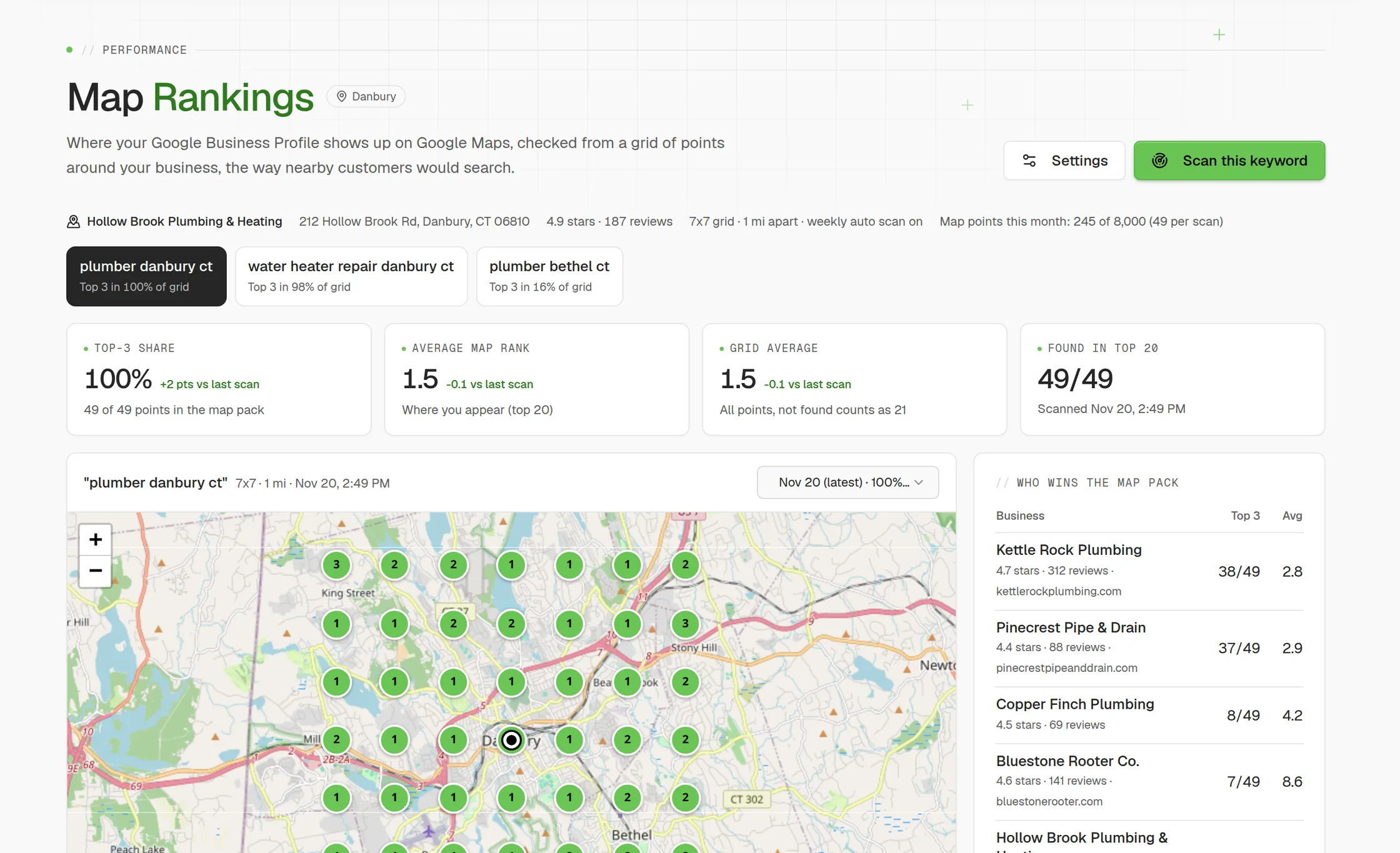
  • 5x5, 7x7 or 9x9 grids, with 0.5 to 5 miles between points, up to 81 points per scan.
  • Up to 10 map keywords, with weekly automatic scans you can turn on or off.
  • Shows your share of points in the top 3, your average map position, and which competitors win the map pack in each part of your area.

Data: Live Google Maps searches from each grid point

diyseo / map-rankings
Map Rank Tracking in DIY SEO, shown with a sample business

Performance alert emails

An email when your Google numbers move, so you don't have to check every day.

How it works
  • Watches impressions over the last 7, 28 and 60 days against the period before.
  • You choose how big a drop triggers an email, and you can turn alerts on or off under Account & billing.
  • Also tells you about ranking gains, so good news isn't missed.

Data: Google Search Console

//Fix

Fix

Find what's holding your site back, then fix it yourself with steps written for your platform.

Site audit with DIY fixes

Crawls your site the way Google does, scores what it finds, and explains each fix in plain English.

How it works
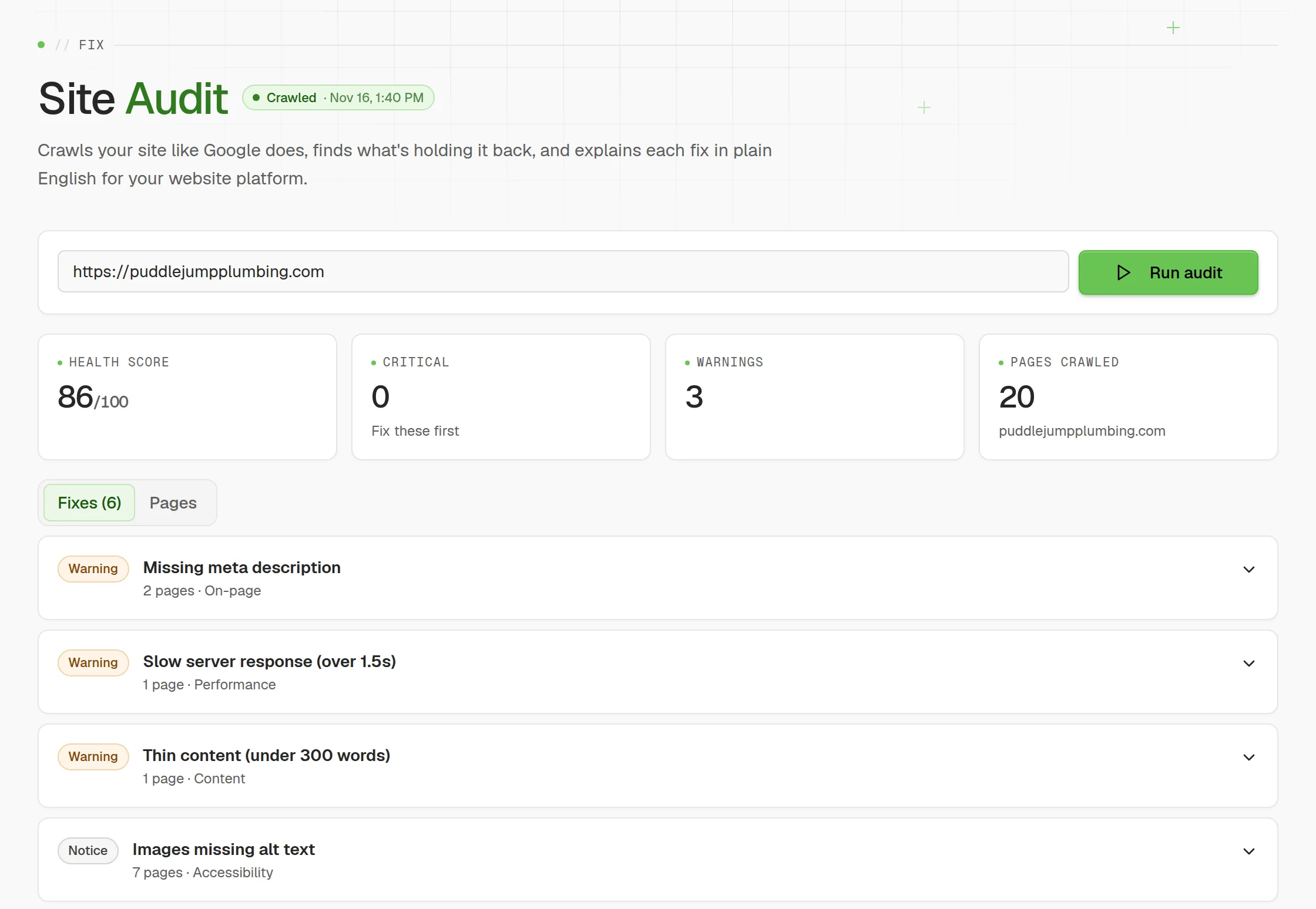
  • Checks pages that return errors, accidental noindex tags, missing or duplicate titles, title length, meta descriptions, H1 headings, thin pages, image alt text, canonical tags and structured data.
  • Checks site-wide basics too: slow server responses (over 1.5 seconds), very large HTML, internal links that redirect, the XML sitemap, robots.txt, HTTPS and the language attribute.
  • Businesses with more than one location also get location checks: a page for each location, its own address and phone, its own LocalBusiness markup, a page linking to every location, and near-copy pages.
  • Each issue links to click-by-click steps for the website platform in your business profile.

Data: DIY SEO's own crawl of your website

diyseo / site-audit
Site audit with DIY fixes in DIY SEO, shown with a sample business

Fix guides for your website platform

Step-by-step instructions for applying each recommendation on the platform your site runs on.

How it works
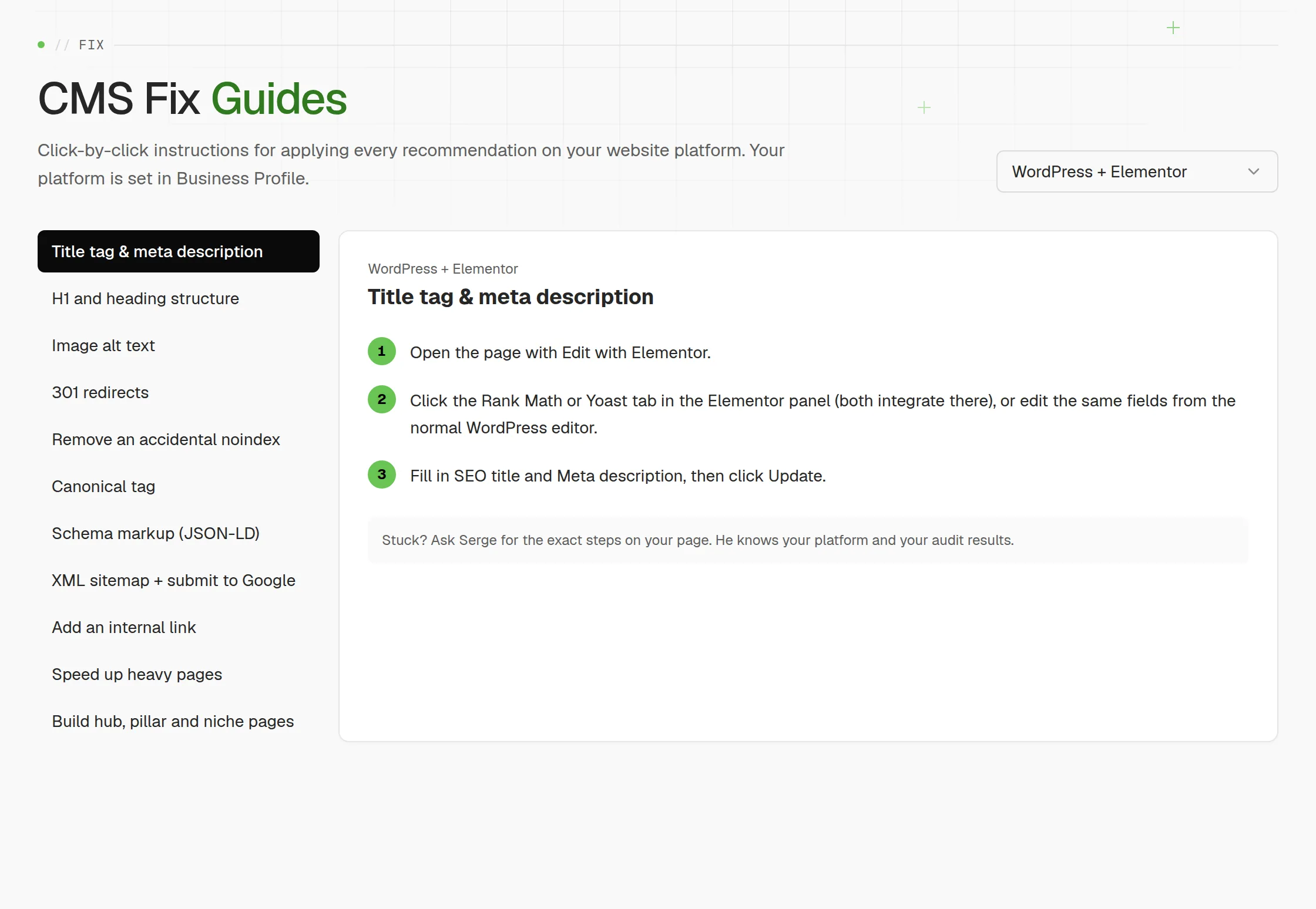
  • Written for WordPress (Yoast or Rank Math), WordPress with Elementor, Shopify, Wix, Squarespace and Webflow.
  • Covers titles and meta descriptions, headings, alt text, 301 redirects, removing an accidental noindex, canonical tags, schema markup, XML sitemaps, internal links, page speed, hub and niche pages, and location pages.
  • Set your platform once in the business profile and every guide, audit fix and Serge answer uses it.

Data: DIY SEO's guide library

diyseo / cms-guides
Fix guides for your website platform in DIY SEO, shown with a sample business

Keyword cannibalization check

Finds searches where two or more of your own pages compete, and tells you which page to keep.

How it works
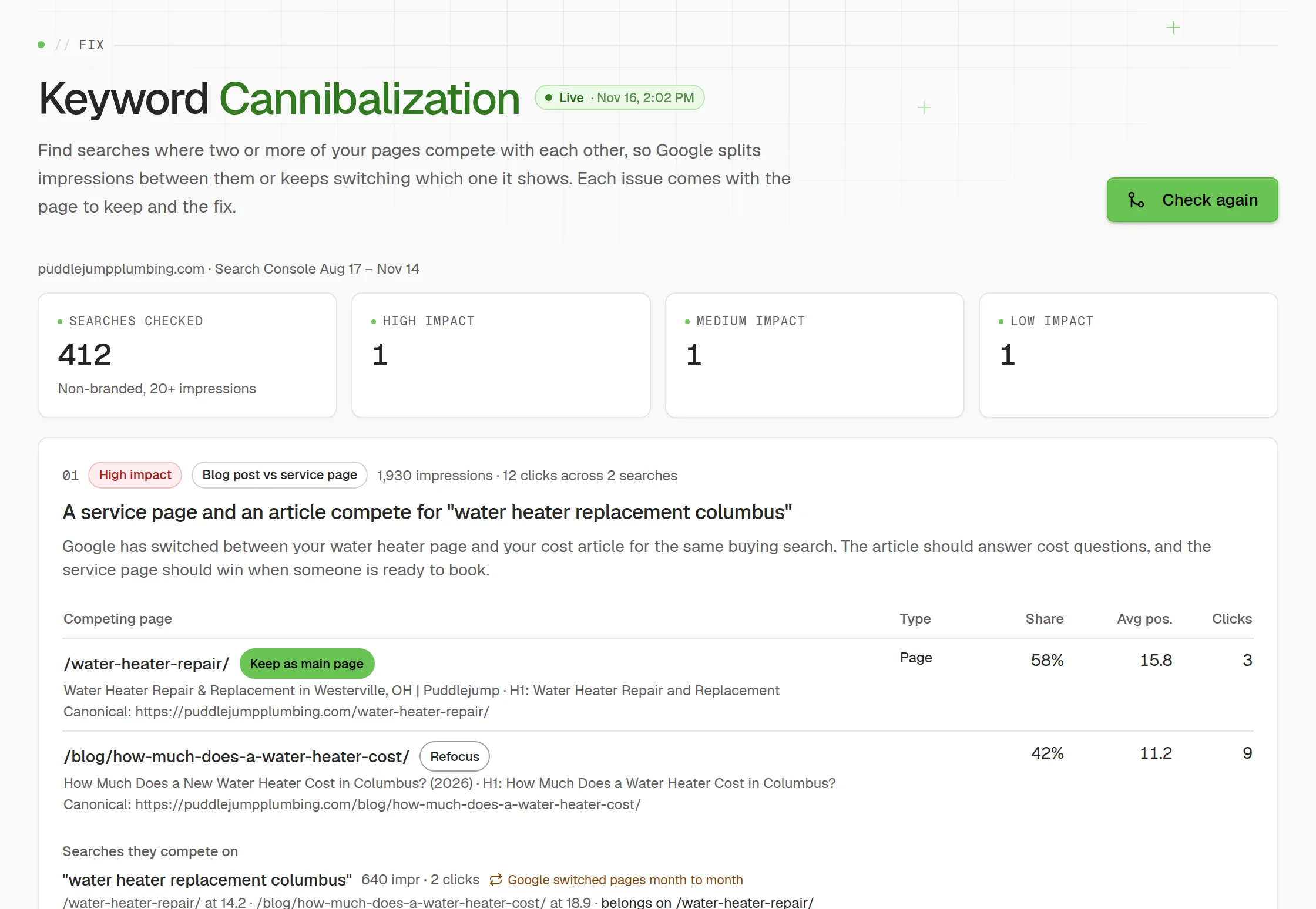
  • Looks for non-branded searches where Google splits impressions between your pages, or swaps the ranking page month to month.
  • Groups each problem by page pair with a severity, the page to keep, and the recommended fix: redirect, canonical, merge or differentiate.
  • Writes a step-by-step fix plan for your website platform.

Data: Google Search Console

diyseo / cannibalization
Keyword cannibalization check in DIY SEO, shown with a sample business
//Grow

Grow

Plan pages, write content from real experience, and build authority the way Google recommends.

Keyword research and topic ideas

Find what customers search, how many search each month, and how hard each search is to rank for.

How it works
  • Monthly search volume, 12-month trend, keyword difficulty, cost per click and search intent for each search.
  • Filter by maximum difficulty and minimum volume to find searches your site can realistically win, with your current position shown next to each one.
  • Get 5 topics turns a keyword into five distinct article ideas, each aimed at a different search so they don't compete.

Data: DataForSEO (Google, United States) joined with your Search Console

Site Architect

Plan how your landing pages fit together, from hub pages down to niche pages, with a build blueprint for each.

How it works
  • Maps the hubs, pillars and niche pages your site needs.
  • Should I niche it? checks 90 days of real Search Console demand for a page idea and gives a clear yes or no.
  • Uses Google's doorway and scaled-content policies to decide when a niche deserves its own page.

Data: Your business profile, 90 days of Search Console searches, your site's pages and tracked AI prompts

diyseo / site-architect
Site Architect in DIY SEO, shown with a sample business

Interview-based content

Serge interviews you like a journalist, then writes from your real answers, so every article carries first-hand experience.

How it works
  • Type or speak your answers. Voice typing works in Chrome, Edge and Safari.
  • Add a content direction to set the angle, audience, tone and what to stress or avoid.
  • A length target from the top 5 Google results for the topic sets the depth of the interview, outline and draft. Google has no preferred word count, so the target is met with more of your real experience, never filler.
  • Where a fact is missing, the draft says [ASK OWNER] instead of inventing it. You review the outline before the full draft is written.

Data: Your interview answers, with a length benchmark from the top 5 Google results

diyseo / content-studio
Interview-based content in DIY SEO, shown with a sample business

Information Gain for existing posts

Finds the posts in your sitemap that are close to ranking but not winning, then shows what the top results all cover and what none of them say that you can add.

How it works
  • Scans the posts in your sitemap and ranks them by opportunity: page one but outside the top 3, page two, and posts losing clicks.
  • Compares a post with the top ranking articles for its main Search Console query, or a search you type.
  • Separates table stakes, the topics every ranking page covers, from information gain: what none of them provide that you know first-hand.
  • Each gap comes with what to add, the format, what you'll need and the interview question. One click starts a refresh interview in Content Studio that keeps your URL and marks the new sections.

Data: Your XML sitemap, 90 days of Search Console data and the live top Google results for each post's search

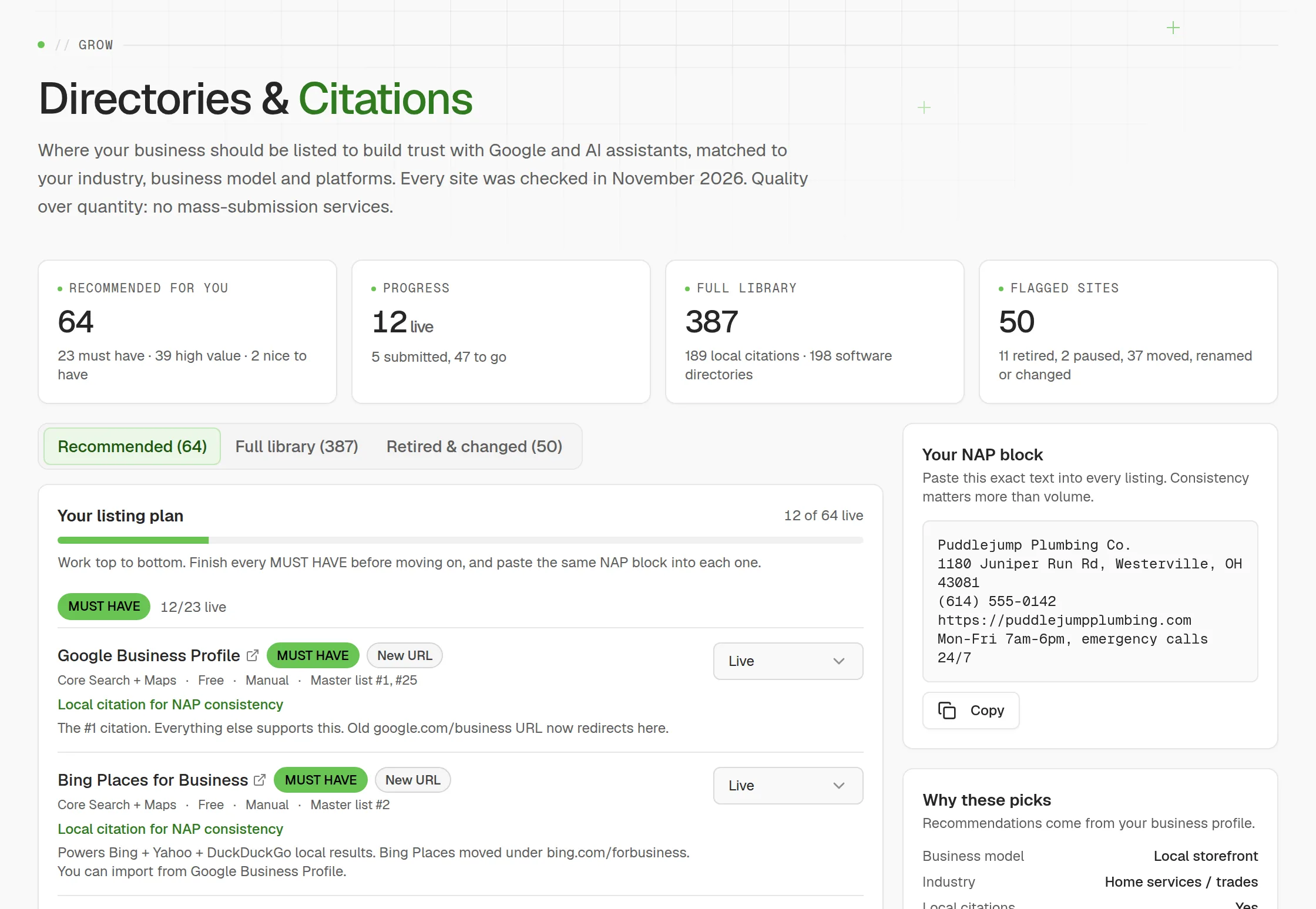
Directory recommendations

Where your business should be listed, matched to your industry, business model and platforms.

How it works
  • 189 local citation sites and 198 software directories, each with a signup link, cost and source.
  • 50 listings flagged as retired or changed, so you don't waste time on dead sites.
  • Your NAP block (name, address, phone) to paste into every listing, plus a checklist to track progress.

Data: DIY SEO's library of 387 directories, checked in November 2026

diyseo / directories
Directory recommendations in DIY SEO, shown with a sample business

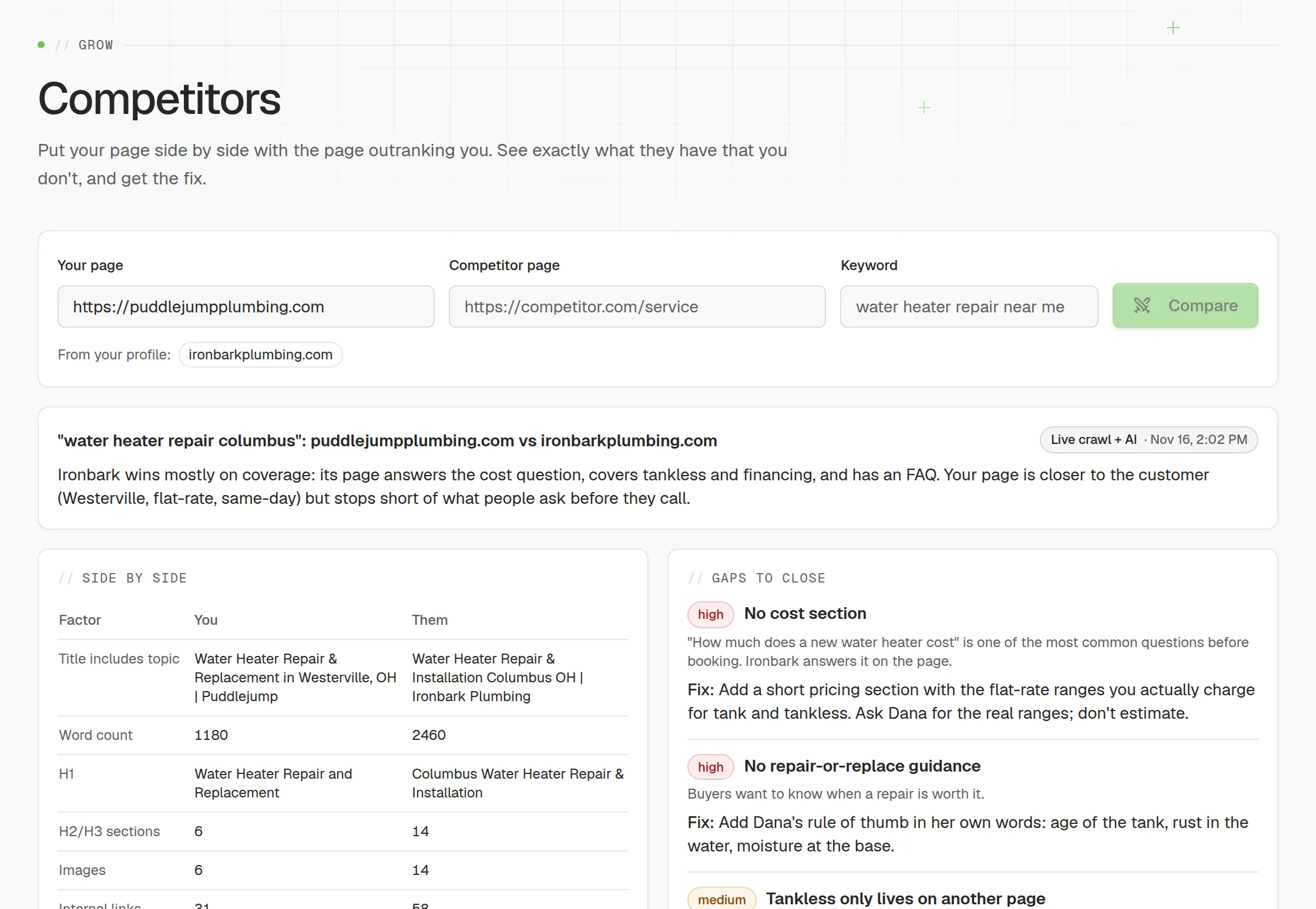
Competitor research

See why a competitor outranks you, and what their page has that yours doesn't.

How it works
  • Put your page next to the one outranking you for a search, and get the gap explained.
  • Compare link strength, referring domains and the searches a competitor wins that you don't.
  • Find link prospects: sites linking to up to 3 competitors but not to you.

Data: DIY SEO's crawl of both pages plus DataForSEO link and ranking data

diyseo / competitors
Competitor research in DIY SEO, shown with a sample business
//Your business

Your business

The details that make every recommendation fit your business instead of a generic checklist.

Business profile and locations

Goes deeper than a name and address. The more you add, the more accurate every recommendation becomes.

How it works
  • Services, highest-margin services, services you don't offer, service areas, ideal customer, customer problems, differentiators, proof and reviews, credentials, experts to interview, competitors, software and platforms, brand voice and goals.
  • Add each real, staffed location. Each gets its own tracked keywords, directory checklist and location-page checks, plus schema markup to copy for its page.
  • Connect Google here and choose your Search Console and Analytics properties. Access is read-only and can be removed any time.

Data: You

diyseo / business-profile
Business profile and locations in DIY SEO, shown with a sample business
//Built on Google's guidance

What DIY SEO won't do

Every recommendation follows current Google guidance. That also means saying no to tactics that put your site at risk.

No ranking promises

Nobody can guarantee a position on Google. DIY SEO shows what's happening and what to do next, and says plainly what it can't know. In Google's words, "No one can guarantee a #1 ranking on Google."

Google: Do you need an SEO?
No paid links or link schemes

Directory picks are real listings that fit your business, never mass submissions or links bought for rankings.

Google spam policies
Disavow only when it's warranted

Google says most sites will not need the disavow tool, so the backlink audit only suggests one when your links call for it.

Google: disavow links to your site
No invented details

Content comes from your interview answers. Missing facts are flagged for you to fill in, and length targets are met with real experience, not filler.

Google: helpful, reliable, people-first content
//FAQ

Questions about the features

Google Search Console and Google Analytics 4 power the live dashboards, keyword tracking, cannibalization check, internal link suggestions and alerts. The site audit, backlink audit, directories and competitor research work from your website address.

Yes. Every core feature is included for $99 a month, with 6 interview-based content pieces each month. Map Rank Tracking is an optional $20/month add-on. New accounts start with a 7-day free trial.

Yes. Your plan includes one location, and each extra location is $10/month, up to 25. Each one gets its own tracked keywords, directory checklist and location-page checks in the site audit.

No. Serge and every AI feature run on DIY SEO's built-in Claude backend. Connecting your own Claude Desktop through MCP is optional.

No. Google access is read-only, and DIY SEO never logs in to your website. It tells you what to change and gives you the steps for your platform, and you make the change.

See pricing, read how DIY SEO uses your Google account, or ask us a question.

Every tool an SEO would use. Explained for owners.

Live Google data, a site audit you can act on, interview-based content and AI search tracking in one plan.

© 2026 DIY SEO